Loading...

How do I remove a Leviton Load Center From the App?

If you are removing the panel from the My Leviton app as a troubleshooting step, please call technical services for assistance, you should not need to reset the hub or breakers. 

When resetting a hub it is recommended to use the Delete Breaker option for all of the breakers connected to the LDATA Smart Hub.  If breakers are not deleted prior to removing the hub they will require additional seps including a factory reset prior to re-enrolling

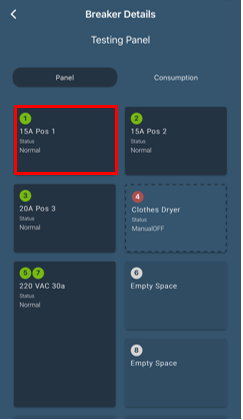
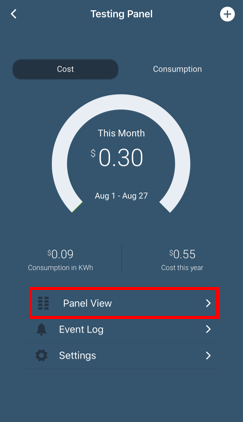
From the Manage screen press the Panel View:
Remove Breaker

Choose a breaker you wish to delete.  If you are resetting the entire panel this process will be repeated for all of the smart breakers in the load center.

Remove Breaker

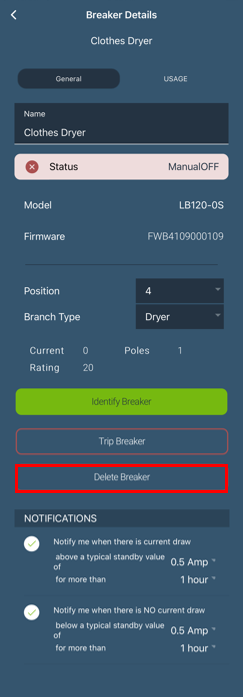
Scroll down and choose the delete breaker option.

Remove Breaker

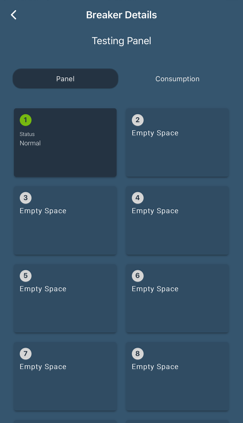
When complete your panel view will be empty:

Remove Breaker

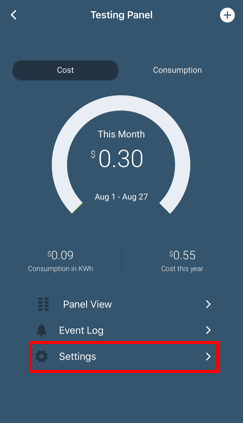
Once the panel is empty press the < in the upper left to return the the Manage screen.  Press Settings:

Remove Breaker

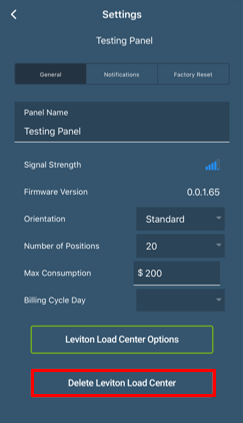
ONLY IF ALL BREAKERS HAVE BEEN REMOVED, choose the Delete Leviton Load Center Option:

Remove Breaker

All breakers and the LDATA interface are removed and ready to be re-enrolled.