

Loading...

How to Install the Leviton D315S Smart Wi‑Fi Switch

What is the Leviton D315S?

The D315S Decora Smart Wi‑Fi Switch is a 15A smart lighting control device that allows control via the My Leviton app, voice assistants, and smart home platforms. It connects directly to 2.4 GHz Wi‑Fi and requires no hub.

Important Safety Notice

This is a simplified smart switch install guide. Always follow the official instructions and warnings included with your device.  Installation requires electrical knowledge. If you are unsure of any steps, consult an electrician.

  • Turn OFF power at the circuit breaker before starting.
  • Verify power is off using a tester.
  • A neutral wire is required.

Is there an installation video that shows me step-by-step?

Yes, watch it here and pause as needed.   (NOTE: Video will be uploaded to YT soon).

What Tools Do I Need to Install a Smart Switch?
  • Screwdriver
  • Pliers
  • Wire stripper
  • Voltage tester
  • Wire connectors

Installation Steps for Single-Pole Smart Switch Installation
  1. Turn Off Power
    • Turn off the circuit breaker and verify power is off.
  2. Remove Existing Switch
    • Remove wall plate, unscrew the switch, and pull it out. Take a photo of wiring.
  3. Identify Wires
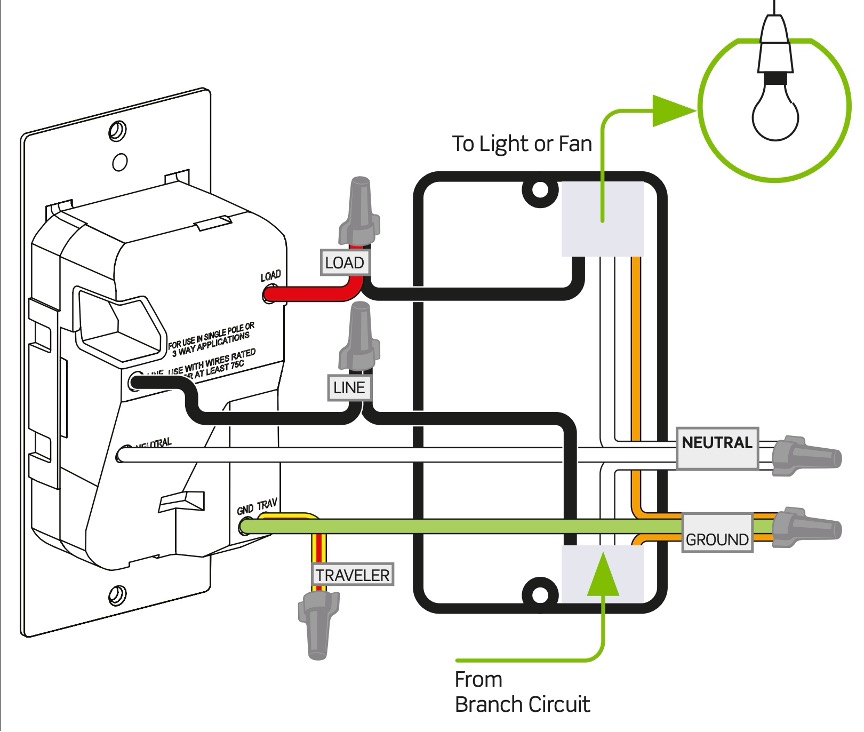
    • Identify line (hot), load, neutral, and ground wires.
  4. Connect the D315S
    • Connect line to line, load to load, neutral to neutral, and ground to ground.
  5. Mount the Switch
    • Push wires back, secure the switch, and attach the wallplate.
  6. Restore Power and Test
    • Turn breaker back on and test the switch.
  7. Connect to the App
    • Download the My Leviton app and follow setup instructions.

Need Help? Support Options

If you get stuck, Leviton offers multiple support resources:

  • 📞 Phone: 1‑800‑824‑3005
  • 📧 Email: DSSupport@leviton.com
  • 💬 Live Chat: Available via Leviton support site
  • 📱 In‑App Support: Diagnostics and help inside the My Leviton app
  • 🌐 Online: Leviton support pages and installation guides

Final Reminder

Always follow official installation instructions and safety warnings.