
Loading...

What app do I need to use with my Leviton Smart Dimmer or Switch?

Leviton has been building Smart switches and dimmers since long before the Smart phone.  Since the introduction of the Smart phone Leviton has continued to make Smart products.  Beginning with the Decora Digital Bluetooth dimmer Leviton standardized on a common aesthetic and engineered different communication technologies to meet the needs of our customers.  Some products connect using a Smart phone and some require a Smart Hub which act as the 'brains' for the system.  If you have a Leviton branded Smart switch or dimmer, this article is here to help you determine what app you should use to control your product.

All current Leviton Smart Products are based on the same platform.  While the aesthetic is similar across many products, the functionality, technology, and app compatibility differ based on the part number.
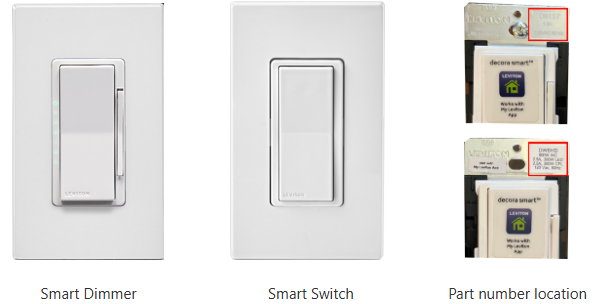
Decora Smart

Each dimmer and switch ships with a sticker that identifies the correct app or technology.  If the sticker has been removed then look in the upper right corner of the top strap.  You will have to remove the wall plate to see the engraved part number or sticker.  The first 2 characters will identify the product family.


D2xxx - Decora Smart 2nd Gen Wi-Fi

DDxxx - Decora Digital Bluetooth

DGxxx - Decora Smart Zigbee

  • Parts Include: DG6HDDG15SDG3HLDG15A 
  • Zigbee enabled devices do not connect directly to a mobile device
  • Use the app for your Zigbee enabled home hub to enroll your switch or dimmer

DHxxx - Decora Smart with HomeKit Technology

  • Parts Include: DH6HDDH15S
  • Use the My Leviton app for firmware updates and configuration
  • Use the Apple Home app for control

DWxxx - Decora Smart Wi-Fi

DZxxx - Decora Smart Z-Wave

  • Parts Include: DZ6HDDZ15SDZ1KDDZPD3DZPA1 
  • Z-Wave enabled devices do not connect directly to a mobile device
  • Use the app for your Z-Wave enabled home hub to enroll your switch or dimmer

ZWxxx - Decora Smart 700 Series Z-Wave

  • Parts Include: ZW4SFZW15R 
  • Z-Wave enabled devices do not connect directly to a mobile device
  • Use the app for your Z-Wave enabled home hub to enroll your switch or dimmer

Prior to the current Decora Smart family of Smart controls Leviton offered controls which used the Z-Wave or X-10 Technology.  These products were sold as the Vizia RF or Decora Home Controls (DHC) family of controls.  These products require a smart hub or remote to setup communication.  These products pre-dated modern Smart phones and apps.  Some 3rd party companies may offer control options.