
If your Alexa Skill becomes disconnected it is easy to reenable the Skill.
Open the Alexa App
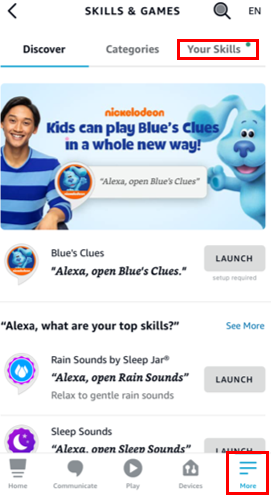
- In the lower right corner choose 'More'
- Choose 'Skills & Games'
- In Skills & Games choose 'Your Skills'
If your Alexa Skill becomes disconnected it is easy to reenable the Skill.
Open the Alexa App
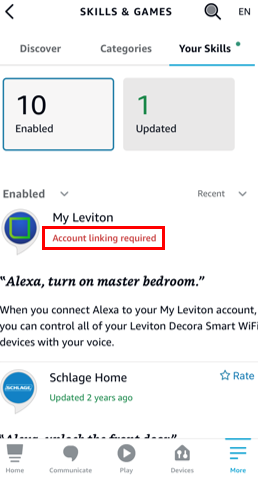
You will find the My Leviton Skill in either the Enabled or Update tab.
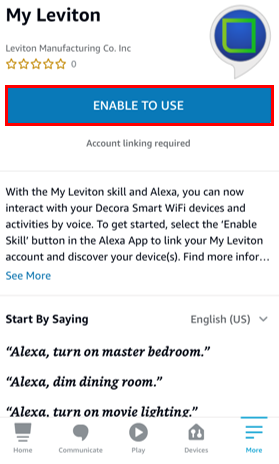
Choose ' Enable To Use'
Enter your My Leviton e-mail and password
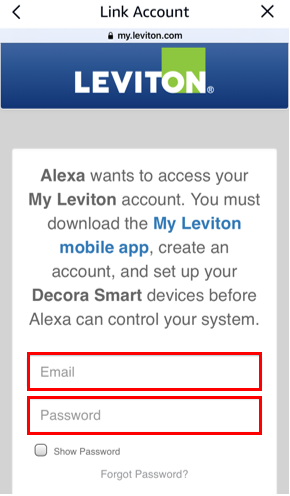
The account will be relinked
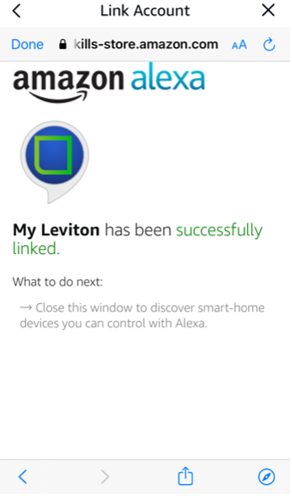
When a relinking occurs the Alexa app will prompt to rediscover your devices. Please follow the directions in the article Does Decora Smart® Wi-Fi work with Amazon Alexa?