Loading...
Charging Technology from A to PD

Charging Technology from A to PD

It seems like every day we are flooded with new information on the latest technology for a faster, better charge to keep our devices up and running. Let’s face it, sometimes it’s hard to keep up with what it all means.

Let’s break down everything you need to know about USB-C charging, USB wall outlets, and Power Delivery technology.

Undestanding the Basics

Whether you're charging a smartphone, tablet, laptop, or other electronic devices, charging speed depends on how much power is delivered to the device. Power is measured in watts. The higher the wattage, the more power available.

More Watts = More Power = Faster Charging

A high-power USB-C outlet can significantly reduce charging times compared to traditional USB charging solutions.

USB Charging Ports and Power

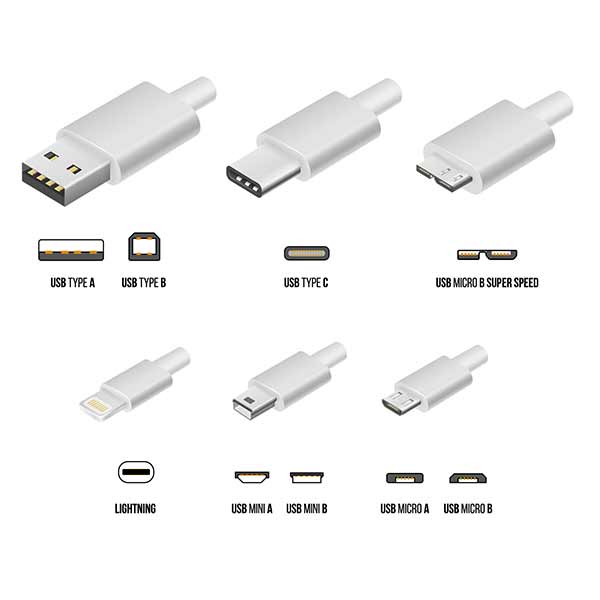
There are many different charging ports and corresponding cable connector heads on the market today, from the latest Type-C™ to the familiar Type A, Lightning, Micro, Mini, 30 pin and others.  It is important to note that there are two ends to a charging cord, the end that plugs into the device and the end that plugs into the charger or USB wall outlet. These connector types on each end could be different.

The illustrations below can help you identify your cord’s connector head (not all connectors shown).
USB Type

What is Type-C

USB-C, also known as Type-C, is the latest connector developed by the USB Implementers’ Forum (USB-IF), a group of industry leaders within the consumer electronics community, such as Apple®, Google®, Intel®, Dell and Belkin.

The goal? Creating a single connector that works with every device in the future. The advantages speak for themselves:

  • Type-C can carry more power, making it ideal for charging laptops and other equipment with higher power requirements 
  • Type-C can be used on either end of the cable, unlike many of the older connectors
  • Type-C is also used for high speed data transfer (in-wall outlet chargers do not support data transfer)
  • The technology works across the most common Operating Systems including iOS, Android, Google, Windows, and others
  • The small size makes it easier to support thinner electronic devices
  • The symmetrical, reversible connector can be easily inserted in either direction
  • It’s “backward compatible” with legacy ports like Type-A when using an adapter
  • Using a common port configuration for all electronic devices (phones, laptops, monitors, printers, etc.) helps reduce landfill, which is produced by discarded electronic equipment and devices

What is Power Delivery (PD)?

Power Delivery technology allows your device to take on more power in a shorter amount of time, resulting in ultra-fast charging.  Because it delivers faster charging to the latest PD-enabled devices, it’s ideal for charging tablets, laptops, smartphones and other devices that require more power for optimal charging.  And, it is only available with the Type-C connector.

What is needed to take advantage of PD?

PD

How Does Power Delivery Work?

Power Delivery enables higher voltages as compared to the common 5V Type A connector/port. The higher voltage enables your device to take on more power in a shorter amount of time which equals faster charging.

For example, a phone may require 15 watts of power (5V @ 3A) and a tablet may require 30 watts (15V @ 3A). A PD-enabled charger can adjust to the power needs for each device in order to maximize charging, reducing the time it takes to charge.

Should I Consider Wireless Charging Instead of a Wall Outlet with USB Ports?

Let’s look at some of the advantages and challenges with wireless charging. 

Advantage:

  • Don’t need to plug in your device every time you need a charge

Challenges:

    • Wireless chargers are not wireless.  They need to be plugged into a USB port or an outlet
    • Wireless charging pads are less efficient then charging with cords:
      • The current Apple phones wirelessly charge at 7.5W versus 18W when plugged in
      • The current Samsung wireless charger provides only 9W versus 15W when plugged in
    • When charging on a wireless pad the placement on the charger may affect the efficiency and the power output. If the device is misaligned the power transmitted to the device is lower
    • Many wireless charging pads/stands won’t work with cases thicker than 3mm.  3mm is equivalent to two stacked pennies 
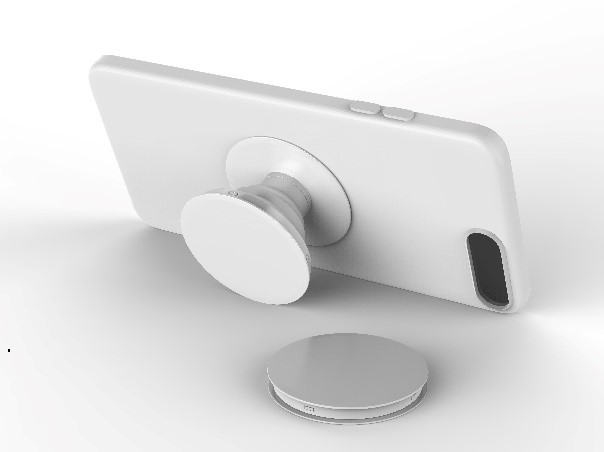
    • Most wireless charging pads/stands will not charge with Pop Sockets or card holders
    USB Socket

    Upgrade Your Home with USB-C Outlets

    Take advantage of the latest charging technology and set yourself up for the future by installing Leviton’s Dual Type-C with Power Delivery USB In-Wall Charger Outlet.

    Remember, even if your devices charge with a Type A USB cord, you can use an adapter with the Leviton Dual Type-C USB Charger and still receive the same charging as a Type A USB outlet.

    Learn more about Leviton USB Chargers.